Smart Tab Organizer

Less tab clutter. More headspace.

Find what matters. Keep your browser organized.

Apex Tabs by VeloLaunch, Smart Tab Organizer: Less tab clutter. More headspace. Find what matters. Keep your browser organized. Highlights: search tabs, domains and URLs; sort tabs and close duplicates; switch between light and dark. Beside them, the Apex Tabs popup is shown in dark and light themes with Organize All, Snooze All, tab search, sorting, Close Duplicates, filters, and the Current Tabs list.
Add to Chrome — It’s Free Explore Apex Tabs

Available on Chrome Web Store · Version 1.0

Apex Tabs at a glance

  • Made for ChromeManifest V3 extension.
  • 4 focused permissionsTabs, tab groups, storage, alarms.
  • No account requiredCore feature state is stored in Chrome’s local extension storage.
  • Light and dark themesProduct themes for the browsing environment.

The current product

See each workflow in the extension.

Every product image below comes from the current Apex Tabs extension. The surrounding copy explains the scope and limits that matter.

Current Tabs

See the current window clearly.

Search by title, domain, or URL, then sort by default order, title, domain, recent activity, or oldest activity. Filter for duplicates, pinned tabs, playing-audio tabs, or browser-discarded and Apex-suspended tabs.

Rows identify active, pinned, audio, duplicate, suspended, and browser-discarded state. Activate, pin, snooze, suspend, or close an individual tab from the dashboard.

  • Close duplicates while keeping the active copy first, then a pinned copy when available.
  • Apply a sort to the browser’s current-window unpinned tabs while keeping pinned tabs at the front.

Group eligible tabs with rules you control

When automatic grouping is enabled, Apex Tabs applies the selected domain rule or first matching custom keyword-topic rule to eligible new or updated ungrouped tabs. Under the same setting, Organize All applies that rule to eligible ungrouped tabs across all open Chrome windows. Tabs already in a Chrome group are left unchanged.

These grouping paths skip missing URLs, chrome:// pages, and chrome-extension:// pages.
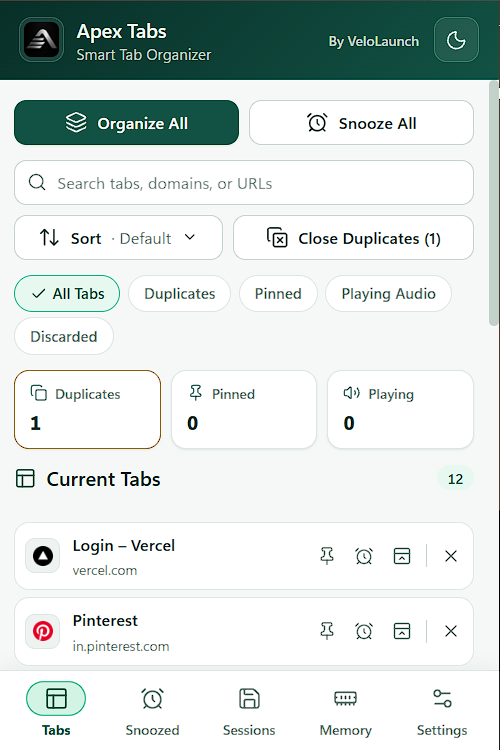
Light-mode Current Tabs dashboard with search, sorting, duplicate controls, filters, metrics, and two tab rows.
A sample Current Tabs view in the extension’s light theme.

Snoozed

Close it now. Bring its URL back on schedule.

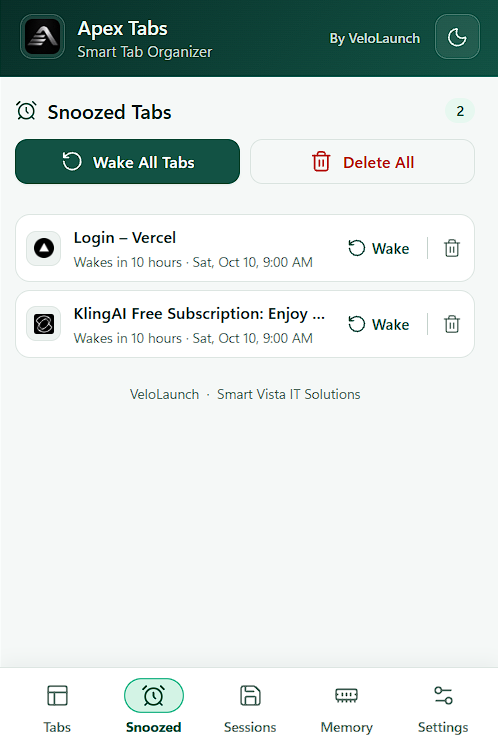
Choose later today, tomorrow morning, this weekend, next week, or a future custom date and time. Apex Tabs closes the tab and schedules its URL to reopen automatically.

Snooze All covers eligible tabs in the current window and gives them a two-hour wake time. In Snoozed, wake or delete one entry, or wake or delete all entries together.

Snoozing closes the tab and later reopens its URL, so form data, scroll position, and other in-page state are not promised. Individual popup snooze actions reject missing URLs and chrome://, chrome-extension://, edge://, about:, and view-source: pages.

Snoozed Tabs screen with two scheduled tabs and Wake All Tabs and Delete All controls.
Sample scheduled entries with individual and bulk controls.

Sessions

Save a window as a named session.

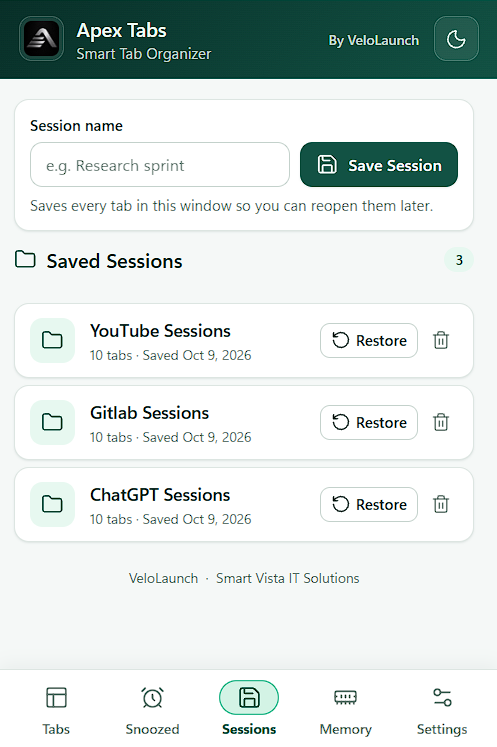
Give a session a name to store the current window’s URLs, titles, and favicons locally. Restoring that saved URL set opens it in a new window.

Saved Sessions screen with a session-name field and three locally saved sessions.
A sample save form and locally saved session list.

Memory

Suspend inactive pages, then restore their URLs.

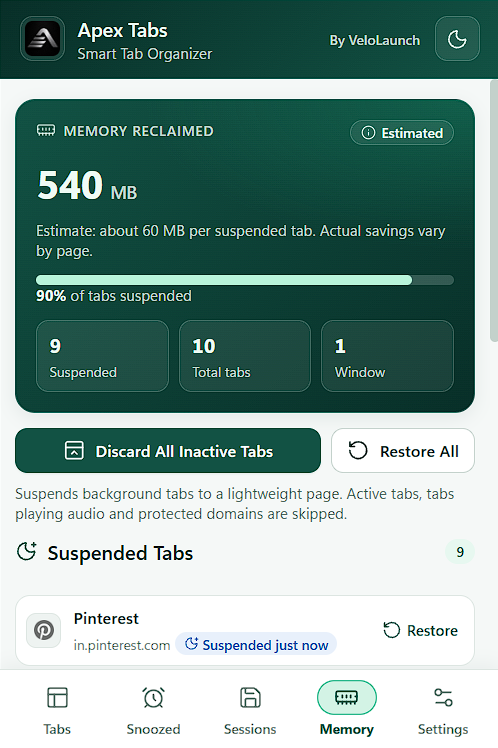
Apex Tabs replaces eligible inactive pages with its own lightweight extension page. It does not call Chrome’s native discard operation. Restoring navigates back to the original URL, so in-page state is not promised.

Bulk suspension works across all open Chrome windows. It excludes active, playing-audio, already Apex-suspended, exact-host protected, missing-URL, chrome://, and chrome-extension:// tabs. Pinned tabs are not excluded by this bulk path.

The dashboard estimates about 60 MB per Apex-suspended tab; actual savings vary by page.

Memory screen showing an estimated memory figure, suspend and restore controls, and a suspended-tab list.
A sample Memory destination with explicitly estimated values.
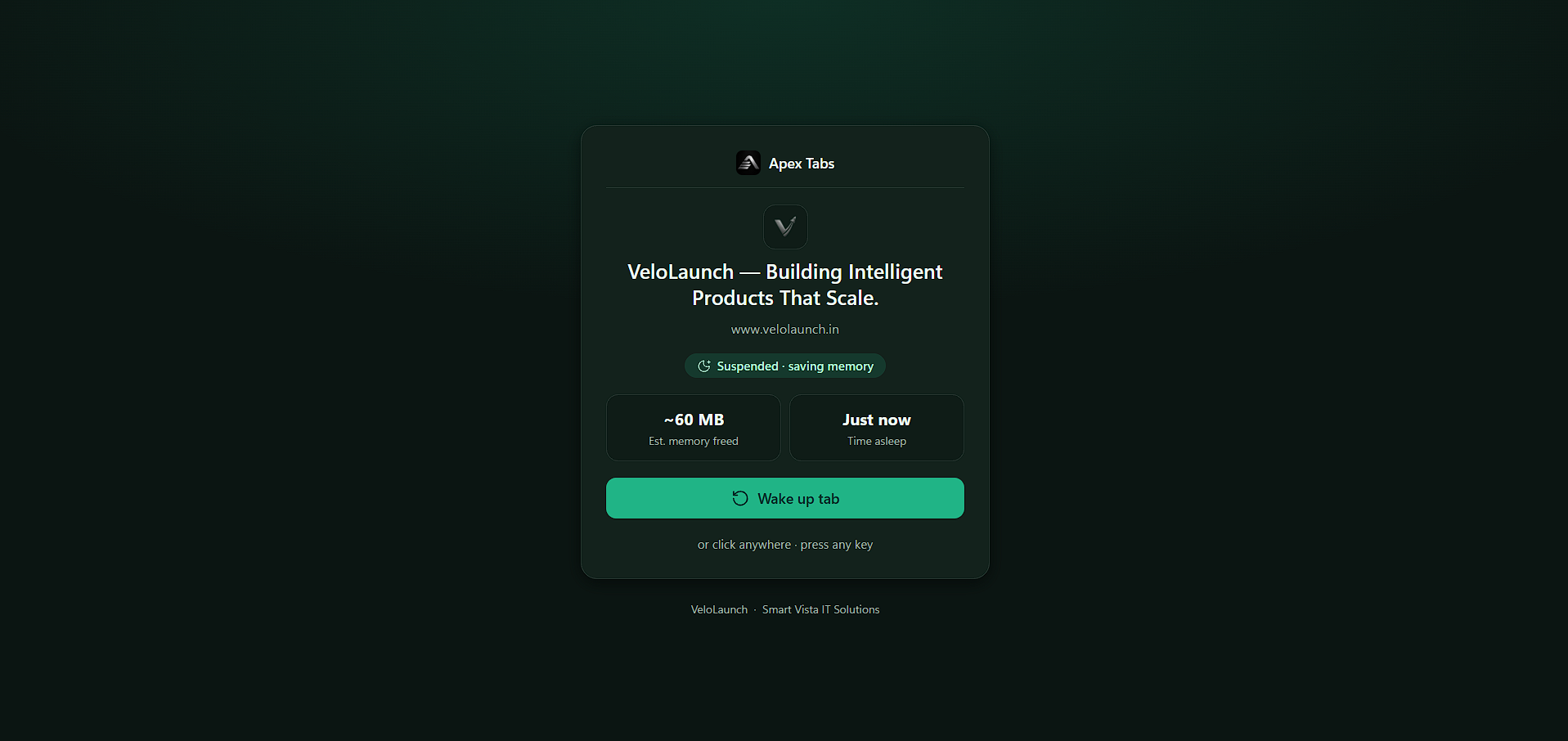
Apex Tabs custom suspended-tab page with an estimated per-tab figure and a Wake up tab control.
The custom suspended-tab page in the extension’s dark theme.

Settings

Tune automation without giving up control.

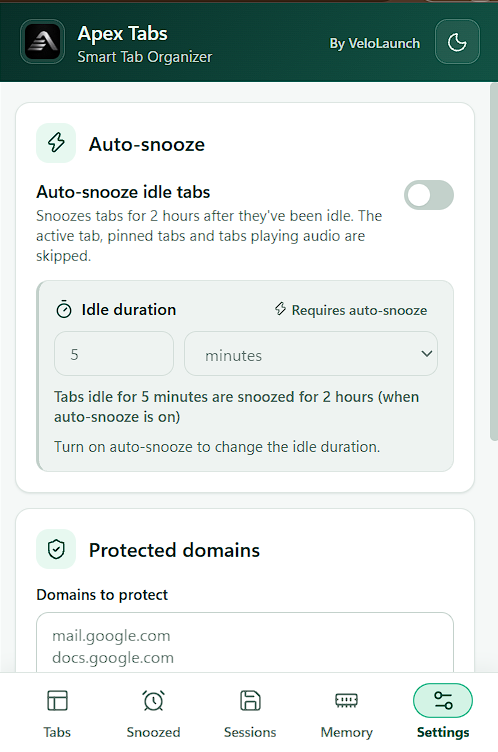
Enable auto-snooze and choose a whole-minute or whole-hour idle duration from 1 minute through 24 hours. When enabled, it closes eligible idle tabs across open windows and schedules their URLs to reopen two hours later.

Auto-snooze excludes active, pinned, playing-audio, exact-host protected, missing-URL, chrome://, and chrome-extension:// tabs. It is separate from custom-page suspension.

The popup also offers light and dark extension themes. The separate full Options page manages domain rules and custom keyword-topic grouping rules. Automatic grouping and Organize All both require automatic grouping to be enabled.

Protection is exact-host only: example.com does not include www.example.com.

Settings screen showing auto-snooze, idle-duration controls, and protected domains.
The popup Settings destination; grouping rules live on the separate full Options page.

A clear loop

Review, act, and return.

  1. 01

    Review

    Open Apex Tabs to search, sort, filter, and inspect the current window.

  2. 02

    Act

    Close duplicates, snooze current-window work, save a session, suspend eligible inactive pages, or—when automatic grouping is enabled—use Organize All to apply the configured rule to eligible ungrouped tabs across all open Chrome windows.

  3. 03

    Return

    Wake scheduled tabs, restore a session or suspended URL, and refine auto-snooze and grouping behavior in Settings and Options.

Snooze closes a tab and schedules its URL to reopen. Suspend keeps the tab slot but replaces the page with Apex Tabs’ lightweight page until you restore it.

Keyboard productivity

Keep common actions close.

These are the default shortcuts; Chrome lets users rebind extension commands.

Alt+Shift+O
Organize AllWhen automatic grouping is enabled, apply the configured rule to eligible ungrouped tabs across all open Chrome windows.
Alt+Shift+S
Snooze current tabSnooze it for 3 hours when it has a non-empty URL that is neither a chrome:// nor chrome-extension:// page.
Alt+Shift+D
Suspend eligible tabsRun the Memory section’s cross-window custom-page suspension with its listed exclusions.

Grounded privacy

Focused access, explained plainly.

No account, cloud sync, or analytics in the current extension. Core feature state is stored locally in Chrome.

Focused permissions

Tabs
Inspect and manage open tabs.
Tab groups
Apply native Chrome grouping.
Storage
Keep local settings and saved items.
Alarms
Run scheduled wakeups and idle checks.

What the current extension does not include

  • Accounts or cloud sync
  • Analytics SDKs or AI services
  • Content scripts
  • Host permissions

Apex Tabs can display site favicons from URLs supplied by Chrome. Those favicon images may be requested from their host even though the extension uses a no-referrer policy.

VeloLaunch and Smart Vista IT Solutions links open external company sites only when selected. Read the complete Privacy Policy.

Apex Tabs for Chrome

A calmer browser starts with clearer tabs.

Bring rule-based grouping, scheduled snoozing, local saved sessions, and custom-page suspension into one focused extension.